
Download NetSpot Wi Fi Reporter – Free Wi‑Fi Management Tool for Windows, macOS & Mobile
Overview
NetSpot Wi‑Fi Reporter is a powerful yet intuitive application designed to help users of every skill level manage, diagnose, and optimise their wireless networks. Whether you’re a home‑user frustrated by dead zones, a small‑business IT manager juggling multiple access points, or a network engineer conducting a site‑survey, NetSpot delivers the data you need in a clean, easy‑to‑read format. The software captures critical network parameters such as signal strength, channel utilisation, security protocols, and interference sources, presenting them through visual heatmaps, detailed tables, and real‑time graphs. By turning complex radio‑frequency information into actionable insights, NetSpot makes problem diagnosis faster and network optimisation more accurate.
The interface balances simplicity with depth. New users can launch a quick “One‑Click Scan” to get an instant overview of their environment, while power users can dive into custom surveys, export raw data, and integrate findings with other network‑planning tools. NetSpot also includes a built‑in reporting engine that generates professional PDFs, enabling you to share findings with stakeholders or keep a historical log of network performance. Security is a top priority: all scans run locally, no data is uploaded without explicit permission, and the application is regularly updated to stay compatible with the latest Wi‑Fi standards (including Wi‑Fi 6/6E). In short, NetSpot Wi‑Fi Reporter provides a free, secure, and feature‑rich solution for anyone looking to get a clearer picture of their wireless landscape.
Key Features
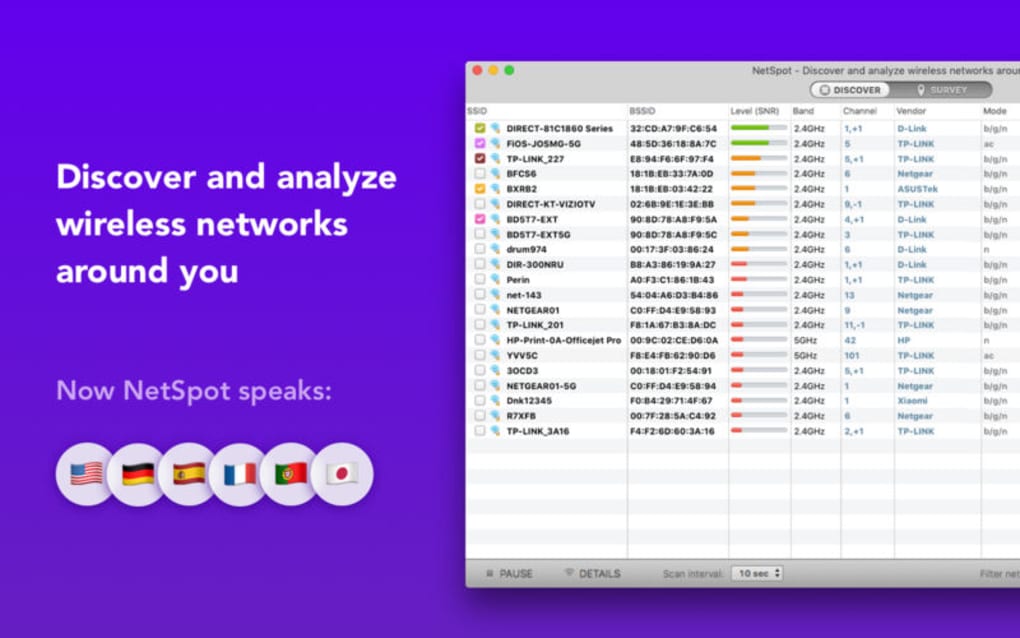
- Real‑time Wi‑Fi Scanning: Instantly view signal strength, channel, and security details for every network in range.
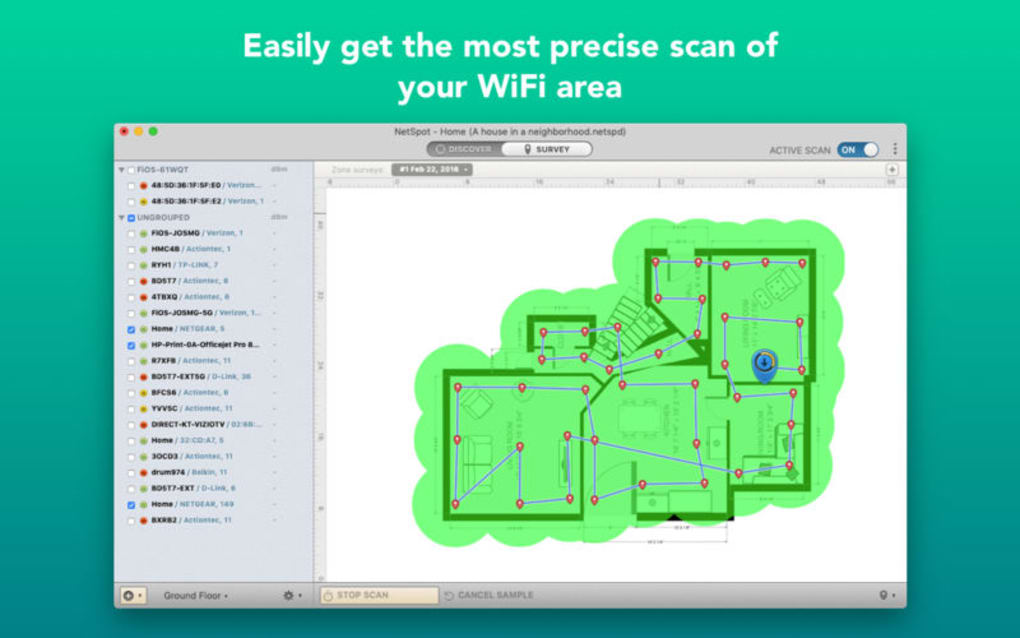
- Heatmap Visualisation: Generate colour‑coded heatmaps that highlight coverage gaps and interference hotspots.
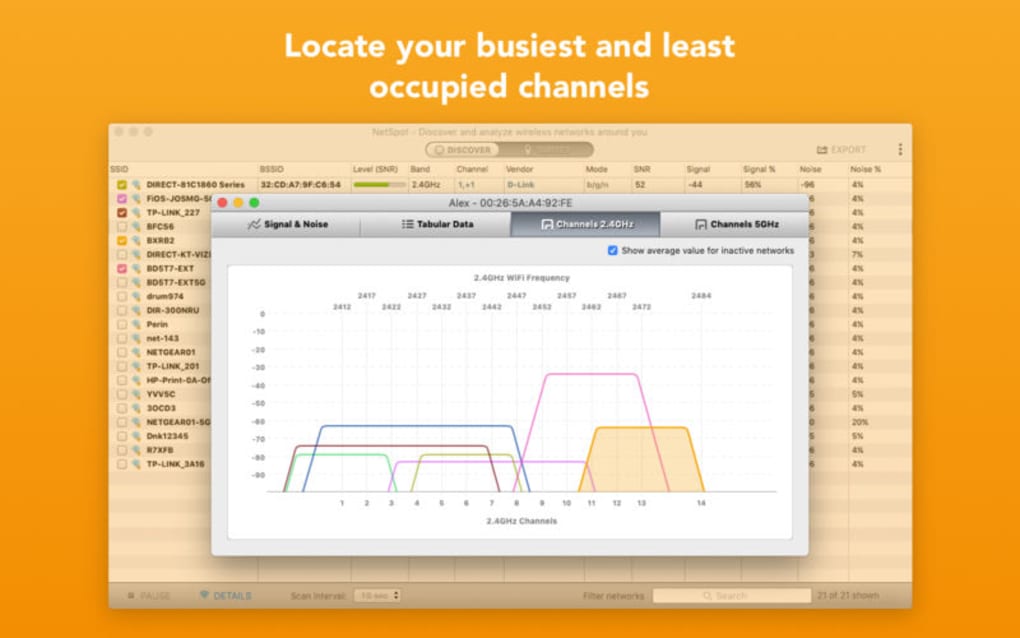
- Channel Interference Analyzer: Detect overlapping channels and recommend optimal channel selections.
- Security Audit: Identify weak encryption (WEP/WPA) and rogue access points with a single click.
- Exportable Reports: Create PDF or CSV reports for documentation, compliance, or sharing with team members.
- Cross‑Platform Support: Available for Windows, macOS, Android, and iOS, ensuring consistent diagnostics across devices.
- Custom Survey Mode: Plan and execute detailed site surveys with waypoint mapping and batch data collection.
- Automatic Updates: Stay current with the latest Wi‑Fi standards and security patches through seamless in‑app updates.
- Low‑Resource Footprint: Runs efficiently on older hardware without compromising accuracy.
- Multi‑Language Interface: Supports English, Spanish, German, French, and more for global users.
These features combine to make NetSpot a comprehensive toolkit for Wi‑Fi management. The heatmap visualisation, for instance, lets you overlay signal strength on a floor‑plan, instantly revealing dead zones that would otherwise require tedious manual testing. Meanwhile, the channel interference analyzer helps you avoid the common pitfall of crowded 2.4 GHz bands by recommending cleaner 5 GHz channels or even Wi‑Fi 6 frequencies where supported. The security audit component is especially valuable for small businesses that need to ensure compliance with standards like GDPR or PCI‑DSS; it flags unsecured networks and suggests remediation steps.
Because the app runs locally, you retain full control over your data—a crucial factor for organisations handling sensitive information. Export options further enhance flexibility: CSV files can be fed into spreadsheet tools for deeper analysis, while PDF reports provide a polished, ready‑to‑present format for meetings. Whether you’re troubleshooting a single device or planning a multi‑site rollout, NetSpot’s blend of simplicity and depth makes it an indispensable asset in the modern wireless toolkit.
Installation & First‑Run Guide
Getting started with NetSpot Wi‑Fi Reporter is straightforward, whether you’re on a desktop or a mobile device. Follow these steps to install and begin scanning within minutes:
- Download the Installer: Visit the official NetSpot website and click the “Download for Windows/macOS/Android/iOS” button that matches your operating system. The file is signed and verified, ensuring a secure download.
- Run the Installer (Desktop): On Windows, double‑click the .exe file and follow the on‑screen prompts. macOS users open the .dmg, drag the NetSpot icon into the Applications folder, and confirm any security warnings.
- Install from App Stores (Mobile): For Android, locate NetSpot in the Google Play Store and tap “Install.” iOS users find it in the Apple App Store and tap “Get.” Both stores handle permissions automatically.
- Grant Permissions: The app requires access to your device’s Wi‑Fi adapter and location services to perform accurate scans. Accept the prompts; this information never leaves your device unless you choose to export a report.
- Launch NetSpot: Open the application. The welcome screen offers two primary modes: “Quick Scan” for an immediate overview, and “Survey Mode” for detailed mapping. Choose “Quick Scan” for a fast first impression.
- Run Your First Scan: Click “Start Scan.” Within seconds, NetSpot displays a list of nearby networks, each with signal strength (dBm), channel, security type, and MAC address. Click any network to view a detailed breakdown.
- Generate a Heatmap (Optional): If you have a floor‑plan image, import it via “File → Import Floorplan.” NetSpot will overlay signal data onto the plan, creating a visual heatmap you can customise with colour gradients.
- Save & Export: After reviewing results, click “Export Report” to generate a PDF or CSV. Choose a destination folder, name your file, and you’re ready to share.
For power users, NetSpot also supports command‑line parameters on Windows/macOS, enabling automated scans via scripts. This feature is handy for scheduled monitoring in enterprise environments. The built‑in help centre, accessible via the “?” icon, provides detailed tutorials, troubleshooting tips, and a community forum where you can ask questions or share findings.
Compatibility & System Requirements
NetSpot Wi‑Fi Reporter is engineered to run on the most common operating systems while maintaining a low resource footprint. Below are the minimum and recommended specifications for each platform:
Windows
- Supported versions: Windows 10 (64‑bit) and Windows 11.
- Processor: Intel Core i3 (2 GHz) or equivalent.
- RAM: Minimum 2 GB, recommended 4 GB.
- Storage: 150 MB free disk space for installation and temporary scan data.
- Wi‑Fi Adapter: Must support 802.11a/b/g/n/ac/ax for full feature set.
macOS
- Supported versions: macOS 10.15 (Catalina) and later.
- Processor: Intel Core i3 or Apple Silicon (M1/M2).
- RAM: Minimum 2 GB, recommended 4 GB.
- Storage: 150 MB free disk space.
- Wi‑Fi Adapter: Built‑in or external adapter supporting modern Wi‑Fi standards.
Android
- OS version: Android 8.0 (Oreo) or newer.
- Processor: Quad‑core 1.5 GHz or higher.
- RAM: 2 GB minimum.
- Storage: 100 MB free internal storage.
- Wi‑Fi: Device must support 5 GHz band for advanced scanning.
iOS
- OS version: iOS 13 or later.
- Device: iPhone 7/8/XS/12/13/14 series or iPad Air/Pro (2019+).
- RAM: 2 GB minimum (handled by the OS).
- Storage: 100 MB free space.
- Wi‑Fi: Must support 802.11ac/ax for full capabilities.
Because NetSpot processes data locally, it does not require an internet connection for scanning, though a connection is needed for updates and for downloading additional floor‑plan templates. The application has been tested on a variety of hardware configurations, and the developers regularly publish compatibility notes to address any driver‑related quirks on newer Wi‑Fi chipsets.
Pros, Cons & Frequently Asked Questions
Pros
- Free core version with no hidden fees.
- User‑friendly interface suitable for beginners and experts.
- Comprehensive heatmap and channel analysis tools.
- Cross‑platform availability (Windows, macOS, Android, iOS).
- Secure local processing; no mandatory cloud upload.
- Regular updates keep the app aligned with Wi‑Fi 6/6E standards.
Cons
- Advanced survey features (e.g., multi‑floor planning) are locked behind a paid “Pro” tier.
- Limited export options in the free version (PDF only, no CSV).
- On some older Wi‑Fi adapters, signal granularity may be reduced.
FAQ
Is NetSpot Wi‑Fi Reporter really free?
Yes, the core scanning and reporting features are completely free. A paid “Pro” upgrade unlocks advanced survey tools, multi‑floor planning, and CSV export.
Can NetSpot scan Wi‑Fi 6 (802.11ax) networks?
Absolutely. NetSpot detects and analyses Wi‑Fi 6 signals as long as your hardware supports the standard.
Do my scan results get uploaded to the cloud?
No. All scanning and processing happen locally on your device. Data is only uploaded if you manually share an exported report.
How often should I run a Wi‑Fi scan?
For home networks, a quarterly scan is sufficient. In dynamic office environments, weekly or even daily scans can help you spot interference before it impacts users.
Can I use NetSpot on a laptop without a built‑in Wi‑Fi card?
Yes, as long as you connect a compatible external USB Wi‑Fi adapter that supports the required standards, NetSpot will work correctly.
Conclusion & Call to Action
NetSpot Wi‑Fi Reporter stands out as a free, secure, and feature‑rich solution for anyone looking to gain clarity over their wireless environment. Its blend of real‑time scanning, visual heatmaps, and security auditing equips users with the insights needed to troubleshoot dead zones, optimise channel usage, and protect networks from vulnerabilities. While the free tier covers the essentials, power users can upgrade to the Pro version for advanced survey capabilities and richer export options. Whether you’re managing a home office or a multi‑site enterprise, NetSpot provides the tools to make informed decisions and keep your Wi‑Fi running at peak performance.
Ready to take control of your wireless network? Download NetSpot Wi‑Fi Reporter now and start visualising, diagnosing, and securing your Wi‑Fi today.







